Production Order
The Production Order module is used to create and manage production requests within the MES system.
It defines the product to be manufactured, the required quantity, delivery details, and production priority.
Production orders act as the starting point for the manufacturing process and are used to generate Production BOMs and Batches for execution.
Prerequisite
Before creating a Production Order, ensure that a Sequence Configuration has been created.
The Add New option for Production Order will only be enabled if the required sequence configuration exists.
This is necessary because the Production Order Number is generated automatically using the configured sequence.
Creating a Production Order
To create a production order:
- Navigate to Production → Production Order.
- Click the Add New button.
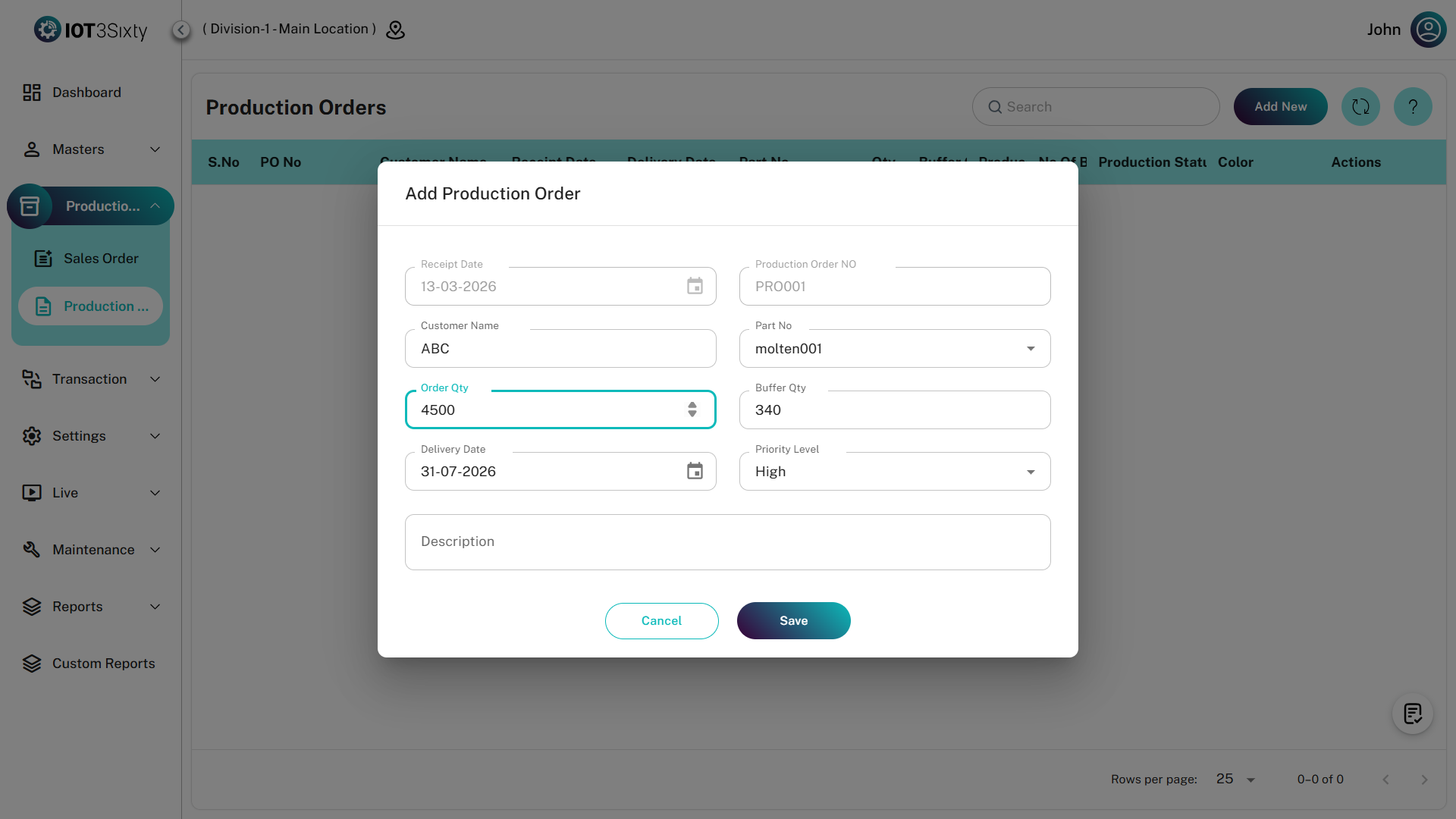
- The Production Order form will open.
- Enter the required production details.
- Click Save.
Once saved, the production order will be created and displayed in the production order list.
Production Order Details
The production order form contains the following fields.
| Field | Description |
|---|---|
| Receipt Date | The date when the production order is created or received. |
| Production Order No | Automatically generated based on the sequence configuration. |
| Customer Name | The customer for whom the product is being manufactured. |
| Part No | The product or part number that needs to be manufactured. |
| Order Quantity | The total quantity requested in the production order. |
| Buffer Quantity | Additional quantity maintained as a buffer for production variations. |
| Delivery Date | The planned date for delivering the finished product. |
| Priority Level | Defines the priority of the order (High, Medium, Low). |
| Description | Optional field used to provide additional information about the production order. |
Saving the Production Order
After entering the required details:
- Verify the production order information.
- Click the Save button.
The production order will be created and displayed in the Production Order List.
Production Order Actions
Once a production order is created, additional production processes can be initiated from the production order list.
Available actions include:
Production BOM
Users can create a Production Bill of Materials (Production BOM) for the selected production order.
This defines the materials required for manufacturing the product.
Batch Creation
After creating the Production BOM, users can generate Batches for the production order.
Batch creation helps divide the production quantity into manageable units for manufacturing execution.
Summary
The Production Order module initiates the manufacturing process in the MES system.
It allows users to:
- Create production requests
- Automatically generate production order numbers
- Define product and quantity details
- Set delivery dates and priority levels
- Generate Production BOM
- Create production batches
This ensures structured and efficient production planning and execution within the MES system.