Material Request
The Material Request module is used to request raw materials or components from a central warehouse or another production location. It ensures that the exact items required for a specific Production Order and Batch are available at the right time for execution.
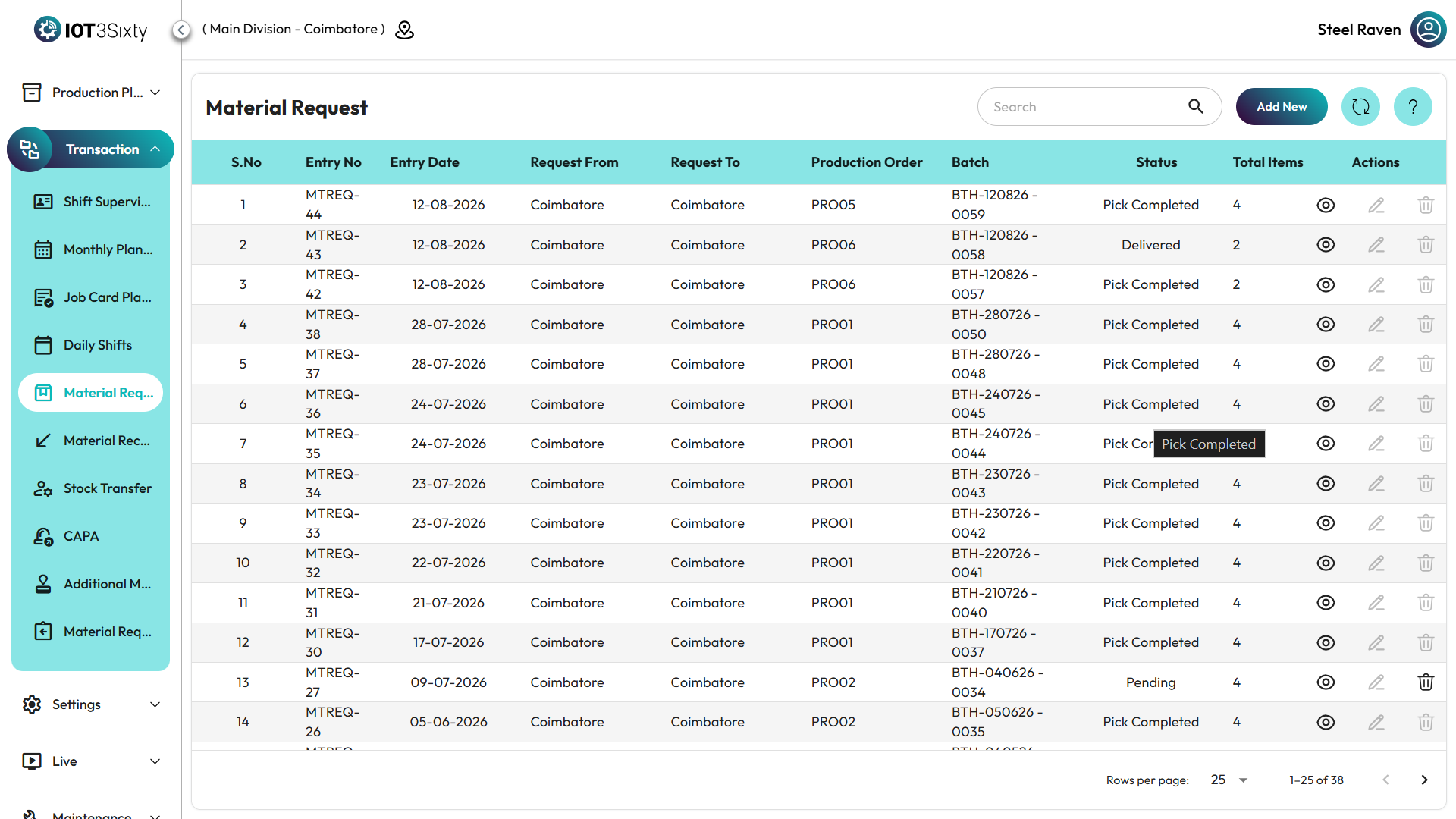
Viewing Material Requests
The main dashboard provides a paginated list of all requests with their current state, allowing for easy tracking of supply chain status.
Status Indicators
| Status | Label | Description |
|---|---|---|
| DRFT | Draft | The request is being prepared and has not been sent yet. |
| PND | Pending | The request has been sent and is awaiting warehouse processing. |
| PCKINT | Pick Initiate | The warehouse has started picking the items for delivery. |
| DLVD | Delivered | The materials have been received at the requesting location. |
Creating a Material Request
To create a new request:
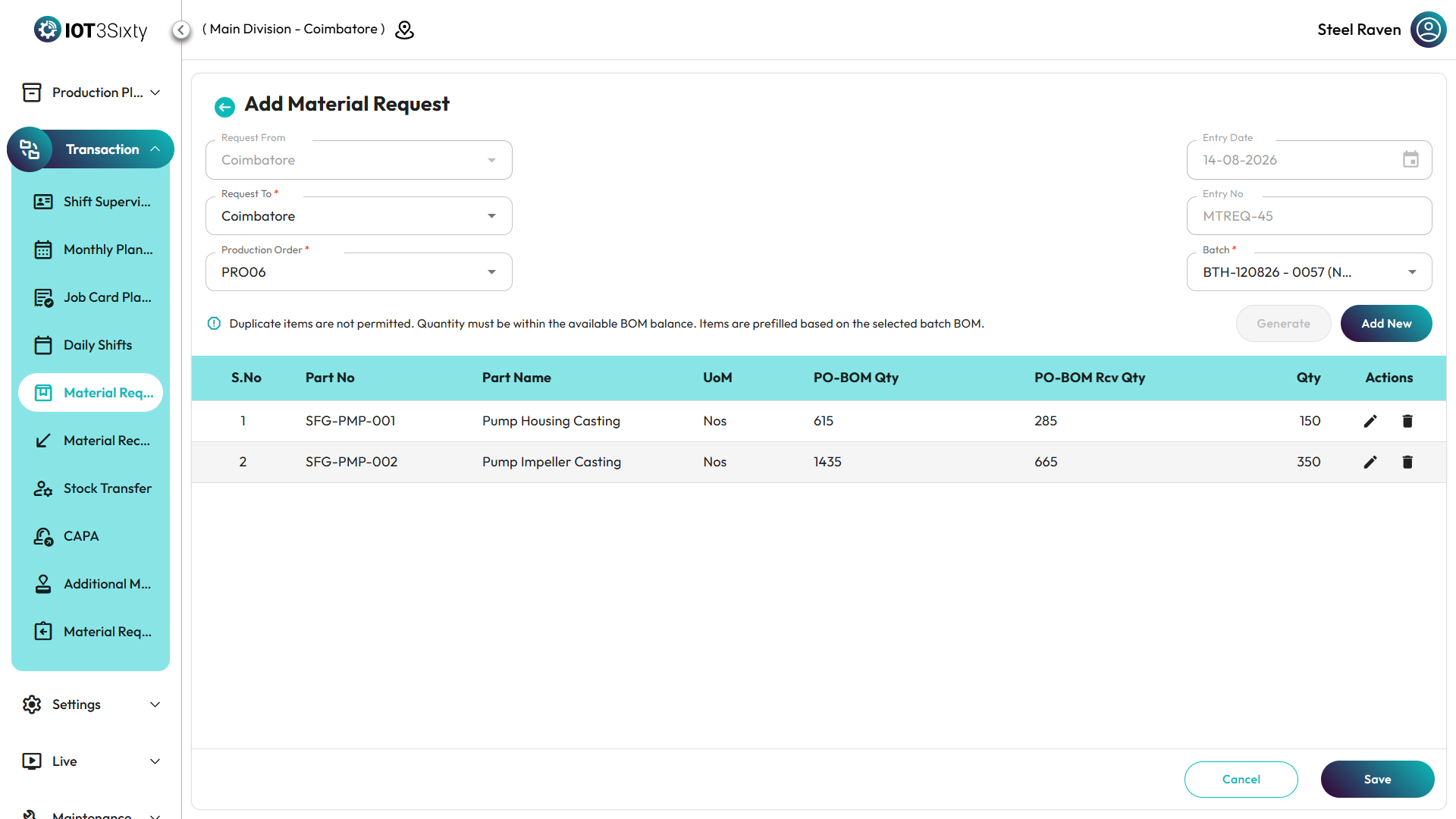
- Navigate to Material Request and click Add New.
- Select Locations:
- Request From: Automatically set to your current production floor location.
- Request To: Choose the source storage location (e.g., Raw Material Store).
- Select Order & Batch:
- Choose the relevant Production Order.
- Select the specific Batch. The system will flag if a draft already exists for this batch to prevent data collisions.
Item Entry Workflow
There are two primary ways to add items to a request, ensuring flexibility for both standard and additional requirements:
1. Generate from BOM (Recommended)
Click the Generate button. The system automatically fetches all components defined in the Bill of Materials (BOM) for the selected batch.
- It pre-fills quantities based on standard BOM requirements.
- It displays the PO-BOM Qty and any Received Qty already processed for full visibility.
2. Manual Entry
Click Add New in the items table to manually add components or extra materials.
- Part No Search: Use the autocomplete field to search for items by code or name.
- Unit of Measure (UoM): Automatically populated based on the item master data.
Validation & Constraints
The system includes strict guards to ensure accurate material management:
- Available Balance: The system prevents requesting a quantity that exceeds the remaining BOM balance (
PO-BOM Qty - Received Qty). - Duplicate Prevention: You cannot add the same Part Number multiple times in a single request.
- Draft Locking: If a batch has an existing "Draft" request, you must continue that draft or resolve it before started a new one.
Saving and Sending
When you finish entering items, click Save. You will be presented with two choices:
- Save as Draft: Keeps the request in DRFT status. It remains editable and is NOT visible to the warehouse.
- Send Request: Sets status to Pending (PND). This finalized state notifies the warehouse to begin picking and delivery.
Summary
The Material Request module optimizes inventory flow by:
- Automating item entry through BOM templates.
- Enforcing strict quantity limits based on actual production orders.
- Tracking real-time material movement status.
- Preventing double-entry and redundant draft requests.