Shift Supervisor Planning
The Shift Supervisor Planning module is a high-density scheduling grid used to plan and track supervisor assignments across all production lines for an entire month.
It provides a visual "at-a-glance" matrix of who is managing which shift and identifies planned gaps or holidays.
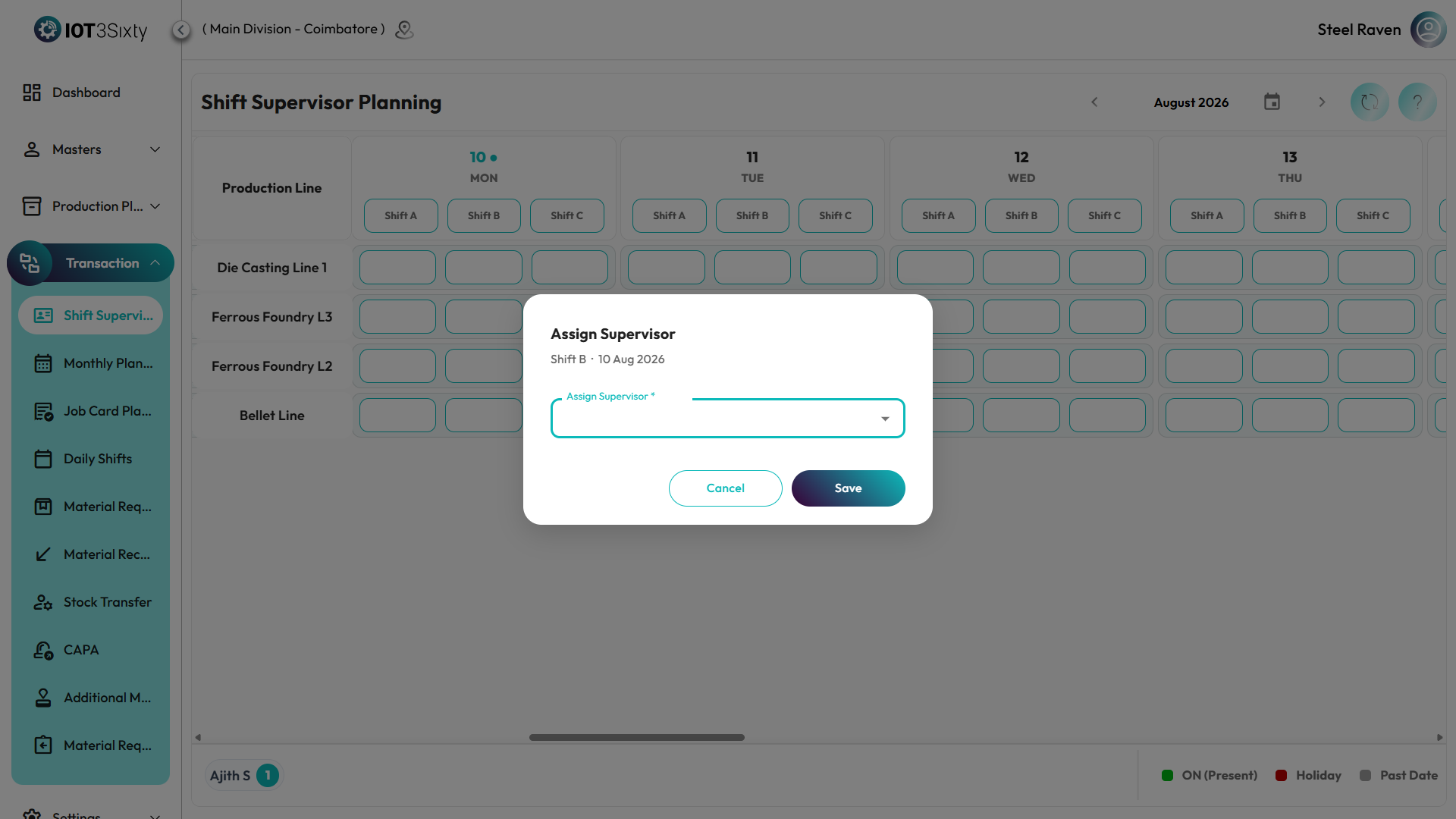
1. The Scheduler Interface
The interface is designed as a dynamic matrix where you can navigate through months and production lines seamlessly.
Grid Layout
- X-Axis (Dates): Chronological days of the selected month.
- Y-Axis (Lines): All active Production Lines in the facility.
- Daily Cells: Each cell represents a full day. Inside, all generated shifts (First, Second, Night, etc.) are stacked as interactive blocks.
2. Visual Legend & Status
The scheduler uses a strict color-coded system to indicate shift readiness:
| Indicator | Color | Description |
|---|---|---|
| ON (Present) | Green Block | A supervisor is assigned to this specific shift. Displays the supervisor's name. |
| Holiday | Red Block | The shift is inactive or a reason (e.g., Election, Maintenance) has been logged. |
| Past Date | Grey Background | Read-only historical data. No modifications allowed. |
| Unassigned | White/Outline | An upcoming shift that requires a supervisor assignment. |
Tooltip Details
Hovering over any shift block reveals a detailed popup showing:
- Shift Name (e.g., "Night Shift")
- Full Supervisor Name
- Operational Status
3. Managing Assignments
To assign or update a supervisor:
- Navigate to the desired date and production line.
- Click the specific shift block (Shift must be active and in the future).
- Select Supervisor: A dialog will open filtering only for supervisors authorized for that specific line.
- Save: The block will instantly turn Green and display the assigned name.
4. Navigation Features
- Auto-Scroll to Today: Upon loading, the scheduler automatically scrolls to the current date, ensuring relevant information is always front and center.
- Month Navigation: Use the arrow buttons or the month-year picker to jump between planning periods.
- High-Density View: The system automatically adjusts column width if a day has an unusual number of shifts (e.g., 5-shift configuration), ensuring the grid never breaks.
Summary
The Supervisor Attendance module simplifies labor management by:
- Consolidating multi-shift complex data into a clean, aligned grid.
- Preventing deployment errors by filtering authorized supervisors per line.
- Visualizing holidays and unassigned gaps through intuitive color codes.
- Optimizing planning time with auto-scrolling and one-click assignments.