Production Line
The Production Line module is used to configure and manage the manufacturing lines within the MES system.
A production line represents the physical or logical setup where a series of operations are executed to manufacture products.
This module connects Operation Mappings, Machines, and Supervisors to define how production activities are organized and monitored on the shop floor.
Creating a Production Line
To create a new production line:
- Navigate to Masters → Production Line.
- Click the Add New button.
- The Production Line configuration form will open.
- Enter the required details.
- Map the required operations and machines.
- Click Save.
Once saved, the production line will be available for production planning and execution.
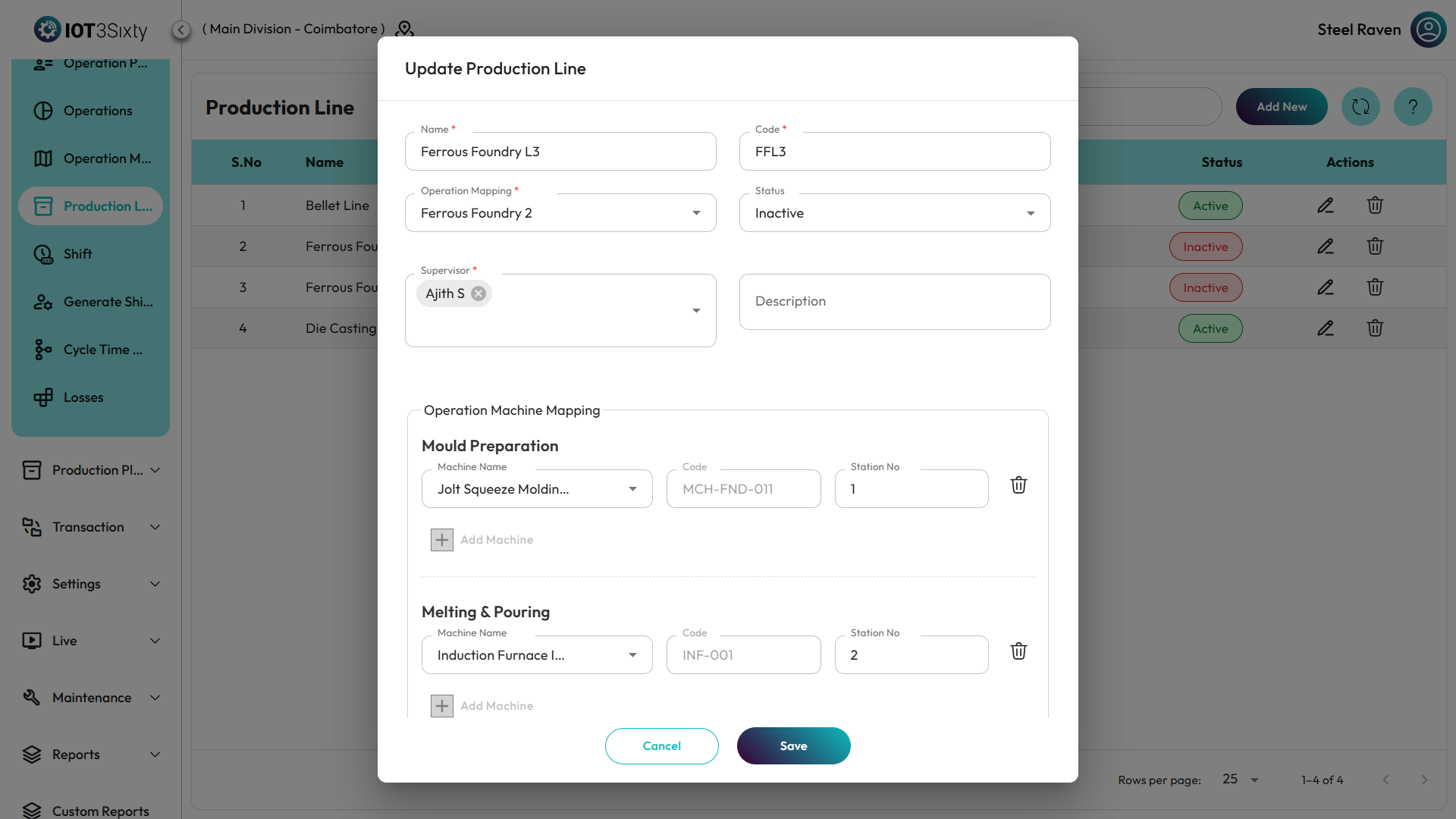
Production Line Details
The production line form contains the following fields.
Name
The Name represents the production line in the system.
Code
The Code is a unique identifier used to distinguish the production line.
Operation Mapping
Users must select the Operation Mapping that defines the sequence of operations for the production line.
The selected mapping determines:
- The operations to be performed
- The order of execution
- The dependencies between operations
Supervisors
Multiple supervisors can be assigned to a production line.
Supervisors are responsible for:
- Monitoring production activities
- Managing operations
- Ensuring smooth execution of the production workflow
The system allows multiple supervisor selection for a single production line.
Operations and Machine Mapping
After selecting the Operation Mapping, the operations defined in the mapping will be displayed.
Operations will appear based on the Resource Type configuration.
Only operations with the following resource types will be available for machine mapping:
- Machine
- Machine and Manpower
Operations configured with only Manpower will not appear in this section.
Mapping Machines to Operations
The system provides tabs for operations, where machines can be mapped.
To map machines:
- Select the required Operation tab.
- Choose the Machine assigned to that operation.
- Repeat the process for all required operations.
This configuration ensures that each operation in the production line is assigned to the appropriate machine.
Saving the Production Line
After completing the configuration:
- Verify the production line details.
- Ensure machines are mapped to the required operations.
- Click Save.
The production line will be created and can be used in production orders and job card generation.
Summary
The Production Line module defines the manufacturing line structure by linking operations, machines, and supervisors.
It allows users to:
- Create production lines
- Assign operation mappings
- Map machines to operations
- Assign multiple supervisors
Proper production line configuration ensures organized production flow and efficient shop floor management in the MES system.