User Master Configuration
Settings Overview
The Settings section in MES (Manufacturing Execution System) provides centralized control over system configurations such as user management, transaction sequences, and barcode templates.
These configurations ensure operational consistency, controlled access, and standardized data handling throughout the MES environment.
Proper configuration within this section helps:
- Maintain data integrity across all modules.
- Enforce role-based access control for security.
- Ensure that every transaction and item has a unique identifier.
- Improve traceability and audit readiness.
User Master
The User Master module is the cornerstone of the MES security and access framework.
It is responsible for creating, managing, and maintaining user accounts, along with defining their roles and permissions.
Through User Master, administrators ensure that every user has the right level of access aligned with their role and responsibilities.
Purpose of User Master
The primary objective of the User Master is to:
- Enable secure and controlled access to MES features.
- Assign roles and privileges according to job functions.
- Support audit tracking for accountability.
- Facilitate multi-level access control for administrators, supervisors, and operators.
Key Functionalities
| Function | Description |
|---|---|
| User Creation | Allows the admin to create a new user profile with required credentials (Username, Password, Email, Department, etc.). |
| Role Assignment | Each user is linked to a predefined role (e.g., Administrator, Manager, Operator) which determines their system privileges. |
| Access Control | Restricts or enables module access based on user roles to prevent unauthorized operations. |
| User Status Management | Enables activation, deactivation, or suspension of user accounts when required. |
| Password Management | Supports password reset, change, and expiration policies for enhanced security. |
| Audit Logging | Tracks user activities for accountability and traceability. |
Role-Based Access Control (RBAC)
Role-Based Access Control (RBAC) ensures that each user’s access to MES modules is aligned with their operational responsibilities.
It improves security, simplifies management, and minimizes the risk of unauthorized actions.
| Role | Description | Typical Permissions |
|---|---|---|
| Administrator | Superuser role with access to all modules, configurations, and reports. | Full access to all MES modules, including settings and audit logs. |
| Manager/Supervisor | Oversees production and quality processes. | Access to reports, production data, and approval functionalities. |
| Operator | Performs daily production-related activities. | Limited access to production entry, material issue, and job tracking. |
| Quality Inspector | Handles quality checks and inspections. | Access to inspection, rejection, and approval modules. |
| Warehouse Staff | Manages stock movement and inventory. | Access to stock transfer, goods issue, and warehouse reports. |
Steps to Create a New User
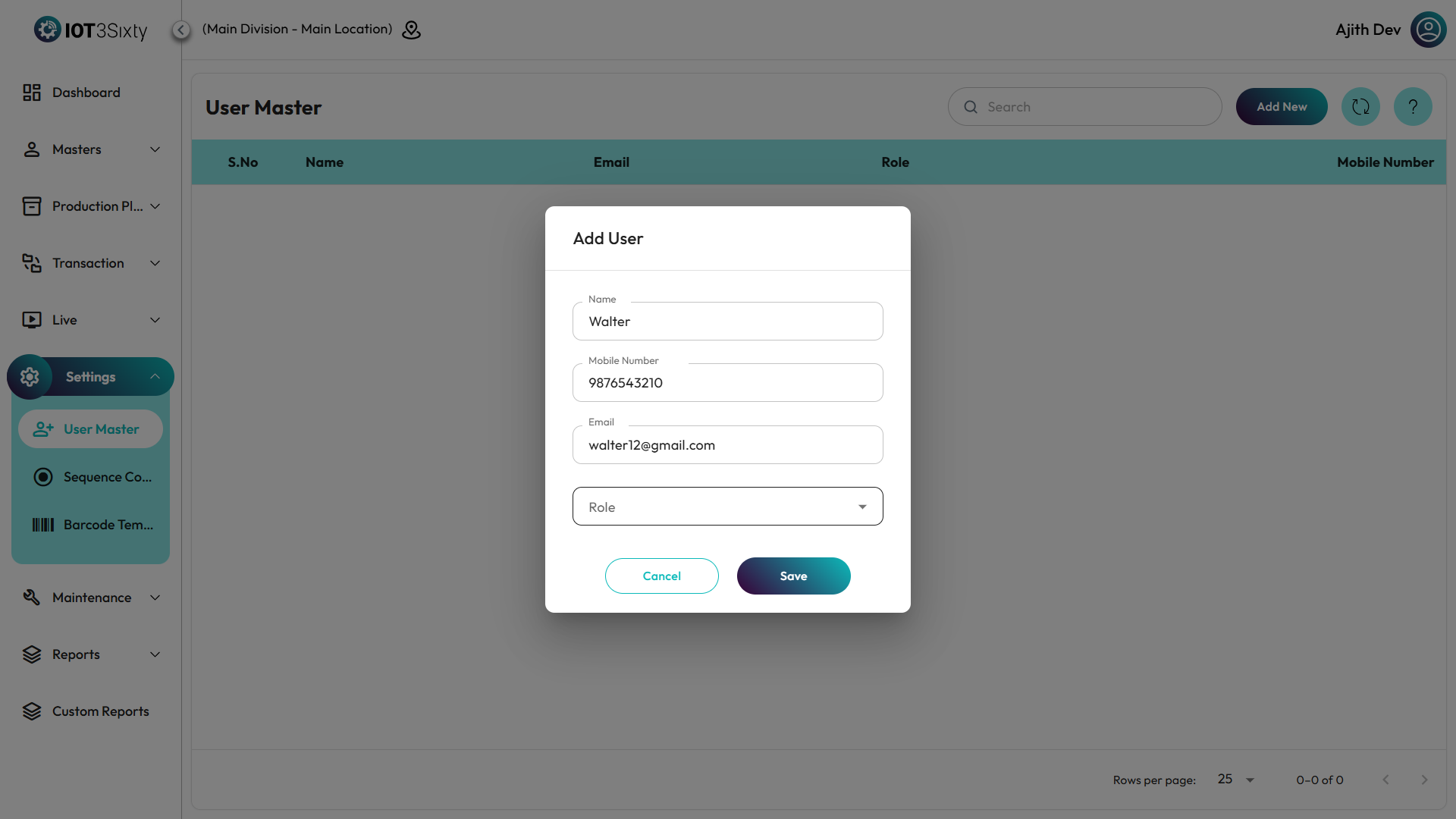
- Navigate to Settings → User Master.
- Click on Add New User.
- Fill in the following details:
- Username – The unique identifier for the user.
- Password – Initial login password (can be changed later).
- Email / Contact Info – For communication and notifications.
- Role – Choose from available roles such as Administrator, Operator, etc.
- Department / Work Area – Assign the user to a department if applicable.
- Status – Set as Active or Inactive.
- Click Save to register the user in the system.
- The user can now log in with their credentials and access modules based on their assigned role.
Security and Compliance Features
- Password Policy Enforcement – The system can enforce minimum password length, complexity, and expiry periods.
- User Activity Logging – Every login, logout, and key transaction is recorded for audit purposes.
- Access Revocation – Administrators can immediately disable accounts for inactive or resigned employees.
- Session Timeout Control – Automatic logout after a period of inactivity to enhance system security.
- Audit Trail Reports – Enable tracking of who performed which action and when.
4.1.6. Example Interface
4.1.7. Benefits of User Master Configuration
- ✅ Enhanced security through controlled access.
- 👩💼 Clear separation of duties across users and departments.
- 📋 Complete audit trail for traceability and compliance.
- 🔄 Simplified management of user accounts and roles.
- 🧭 Improved accountability for every transaction in MES.
✅ Note:
It is recommended that only system administrators manage user accounts and roles to prevent unauthorized configuration changes.