Production Live Kanban
The Production Live Kanban provides a real-time view of production work orders and their progress across various stages.
It helps supervisors and operators monitor production activities, track efficiency, and ensure smooth workflow execution directly from the shop floor.
Purpose
- To display ongoing production work orders in a live Kanban format.
- To show real-time updates of progress and efficiency for each work order.
- To provide a clear overview of production status without manual refresh or navigation.
Overview
The Kanban board is divided into production stages, each representing a part of the production process (e.g., Yet to Start, In Progress, Completed).
Under each stage, corresponding work orders are listed with key details.
Information Displayed
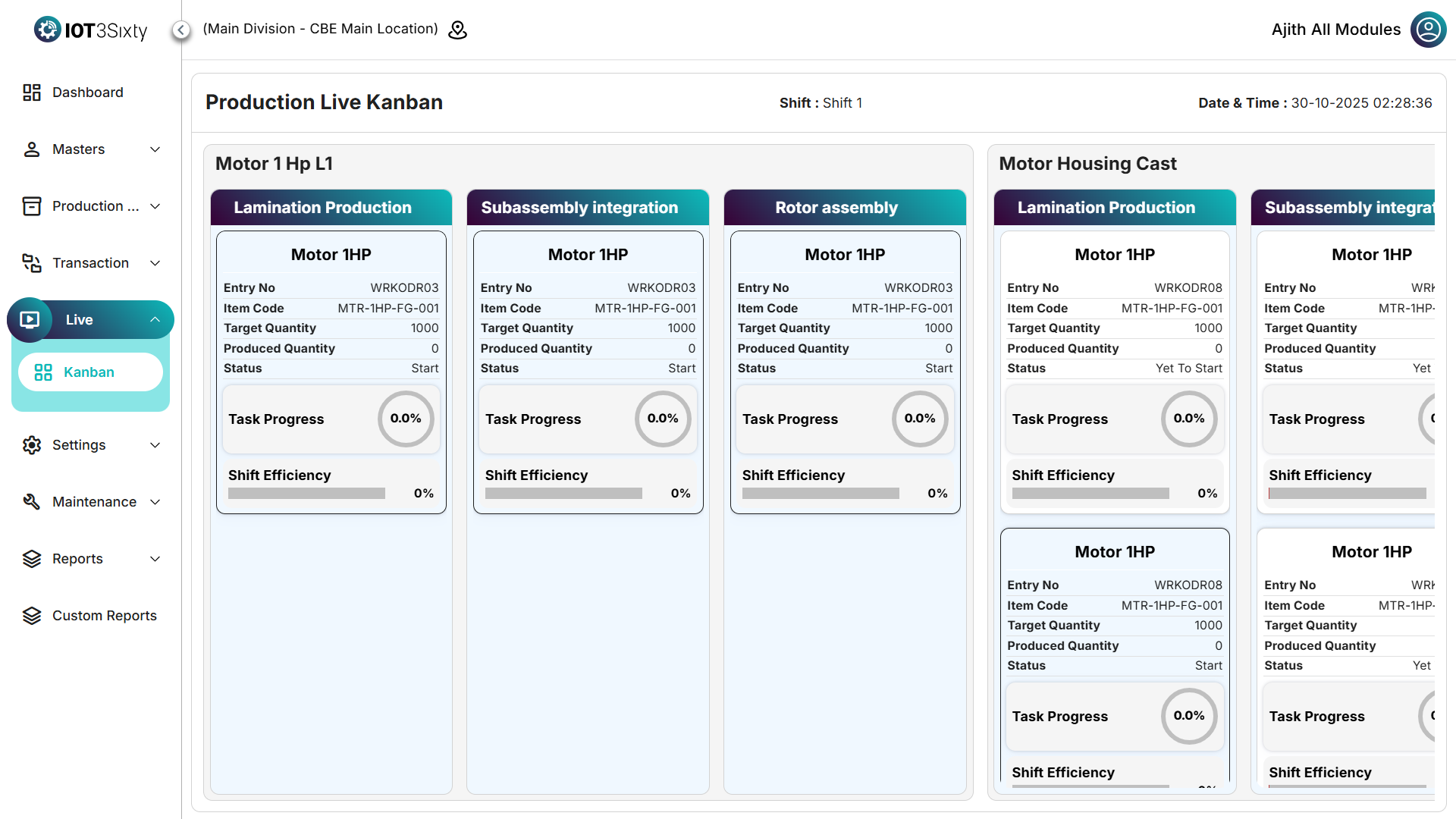
Each work order card displays the following details:
| Field | Description |
|---|---|
| Entry No | Unique work order number (e.g., WRKODR08). |
| Item Code | System-generated item code (e.g., MTR-1HP-FG-001). |
| Item Name | Name of the item (e.g., Motor 1HP). |
| Target Quantity | The planned production quantity for the work order. |
| Produced Quantity | The quantity completed so far. |
| Status | Indicates the current stage (e.g., Yet to Start, In Progress). |
| Task Progress | Displayed as a rounded circular progress bar showing percentage completed. |
| Shift Efficiency | Displayed as a linear progress bar representing the efficiency for the current shift. |
Example Display
| Field | Example |
|---|---|
| Entry No | WRKODR08 |
| Item Code | MTR-1HP-FG-001 |
| Item Name | Motor 1HP |
| Target Quantity | 1000 |
| Produced Quantity | 0 |
| Status | Yet to Start |
| Task Progress | 0.0% (Rounded Circular Progress) |
| Shift Efficiency | 0% (Linear Progress) |
Production Stages
- Yet to Start – Work orders created but not initiated.
- In Progress – Work orders currently being executed.
- Paused / Hold – Temporarily stopped for review or issues.
- Completed – Fully finished work orders.
Each stage lists the corresponding work orders below it, along with real-time performance metrics.
Key Features
- Live Updates: Data refreshes automatically from the MES backend.
- Progress Visualization: Rounded circular progress for task completion and linear progress for efficiency.
- Read-Only Display: Focused purely on monitoring; no movement or editing of cards.
- Clear Layout: Stages appear horizontally, and each contains relevant work order tiles.
- Real-Time Accuracy: Updates whenever production data changes.
Benefits
- Provides complete visibility of live production status.
- Helps supervisors monitor performance and progress in real time.
- Reduces delays by identifying bottlenecks quickly.
- Improves shop floor transparency and productivity.
Summary
The Production Live Kanban acts as a live dashboard for tracking production work orders.
It visually presents progress and efficiency metrics, grouped by production stages, enabling better real-time monitoring and decision-making.