Sales Order
Production Planning
Production Planning acts as the foundation of the manufacturing process, connecting customer requirements with real-time production execution.
It begins with Sales Orders (customer requests), transitions into Production Orders (manufacturing planning), and concludes with Work Orders (task assignments to workers or machines).
This process ensures that every order moves systematically from demand to delivery, maintaining alignment between the ERP system and the MES platform.
2.1. Sales Order
The Sales Order is the first step in the production planning cycle. It represents the orders received from customers, typically imported automatically from an ERP system through ETL (Extract, Transform, Load) integration.
Sales Orders contain vital information such as customer details, company name, item details, and required quantities.
These orders serve as the starting point for production planning, helping to determine what needs to be produced, when, and for whom.
Understanding ETL Integration
What is ETL?
ETL stands for Extract, Transform, and Load, a process used to move data from one system to another in a structured way:
- Extract: Data is fetched from the ERP system (e.g., customer orders, item details).
- Transform: The extracted data is cleaned, formatted, and validated according to MES system requirements.
- Load: The transformed data is then imported into the MES database to create or update Sales Orders automatically.
This automated process eliminates manual entry, reduces data errors, and ensures that the MES always reflects up-to-date customer demand from the ERP.
Sales Order Overview
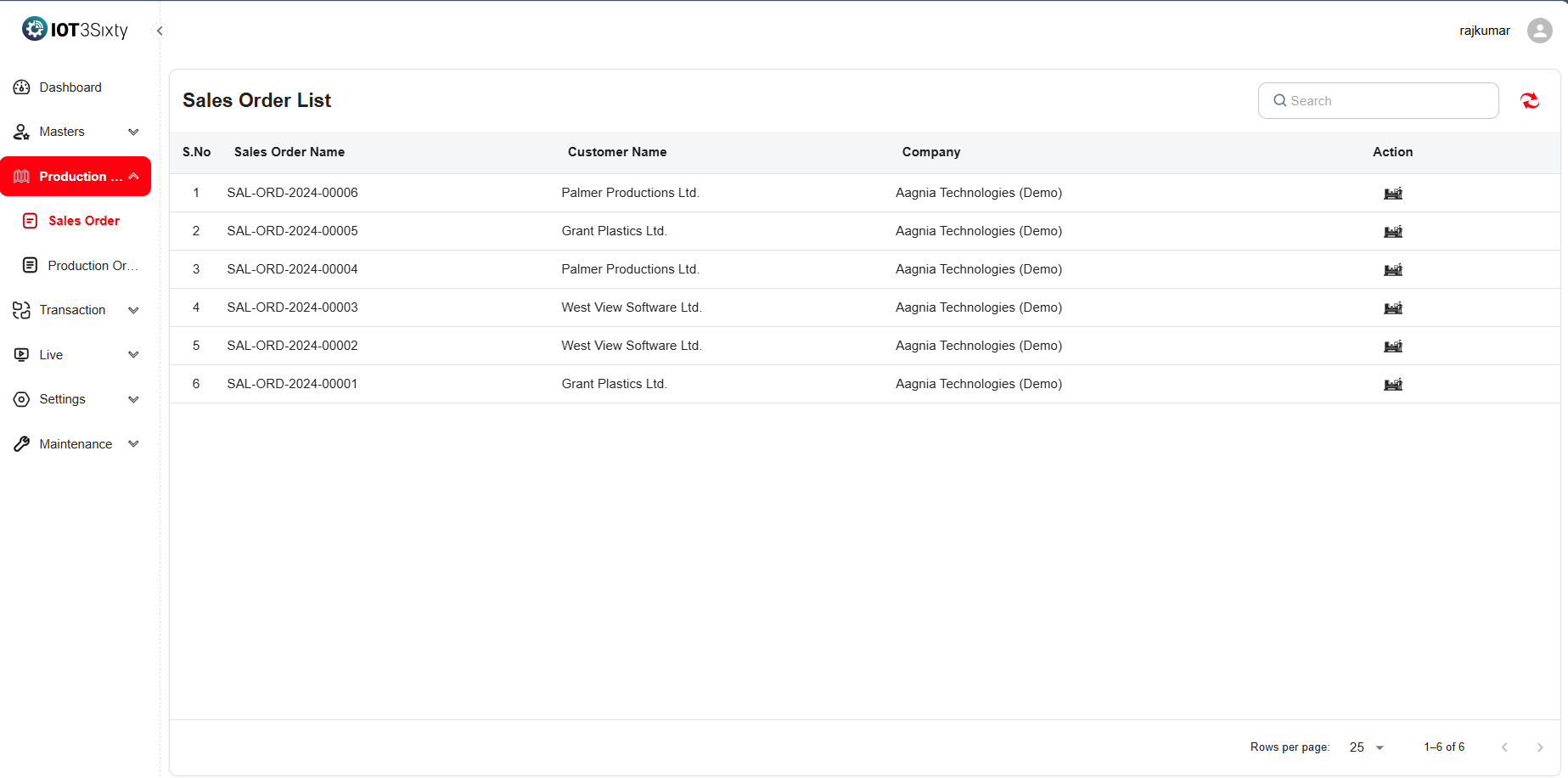
Each Sales Order includes essential information required for tracking and managing production demands.
| Field | Description |
|---|---|
| Sales Order Name | A unique identifier for each sales order. |
| Customer Name | Identifies the customer who placed the order. |
| Company | Specifies the organization handling the order within the MES. |
| Action Button | Opens detailed order information and allows conversion to a Production Order. |
Sales Order Items
When you click the Action Button from a Sales Order, you can view the Sales Order Items — the specific products or components requested by the customer.
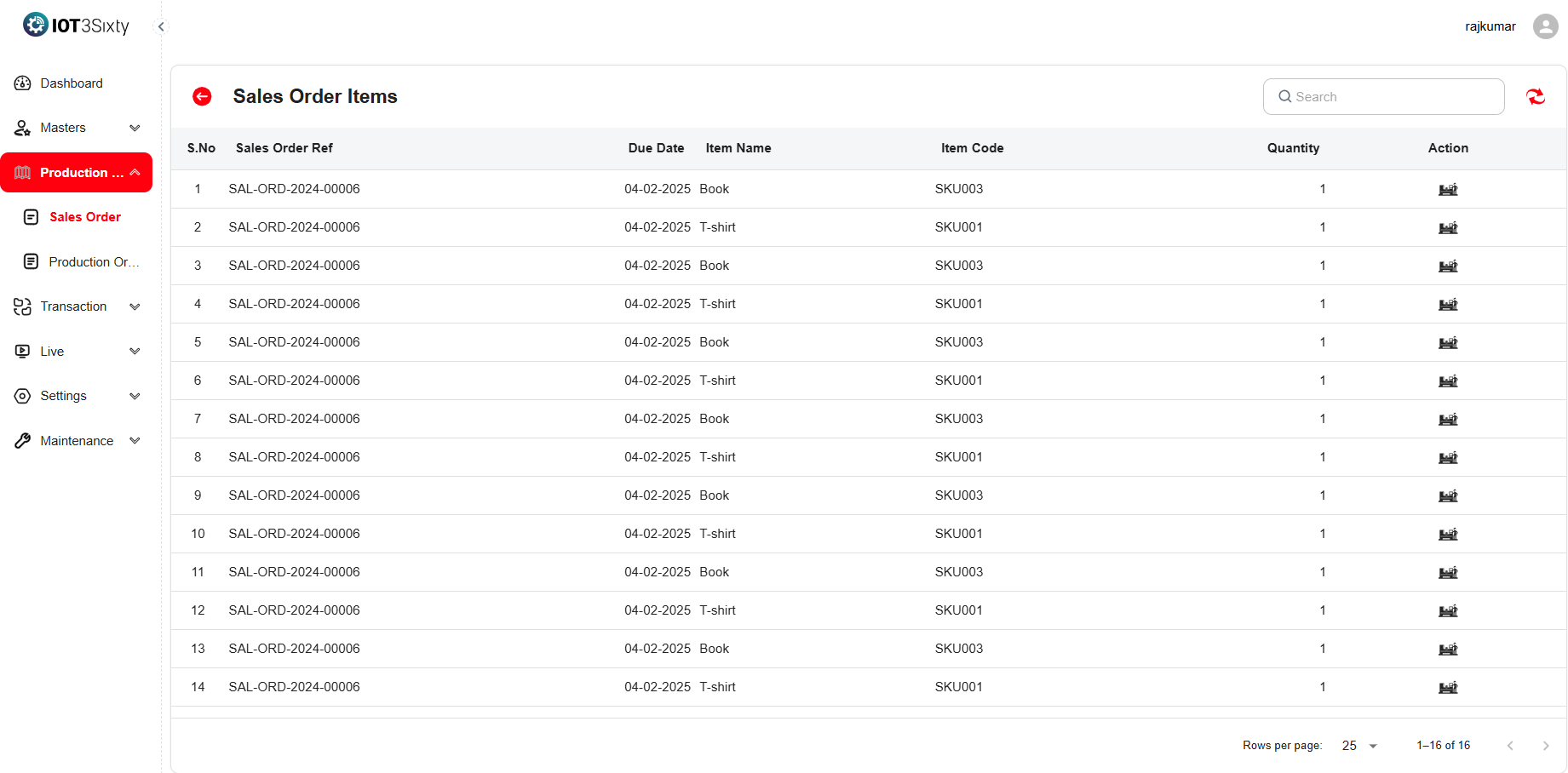
These details include:
| Field | Description |
|---|---|
| Sales Order Reference | A unique code used for order tracking between systems. |
| Due Date | The deadline for completing production and delivery. |
| Item Name and Code | Identifies the specific item included in the order. |
| Quantity | Indicates the total quantity requested by the customer. |
Converting a Sales Order to a Production Order
Once a Sales Order is confirmed, it can be converted into a Production Order, marking the start of manufacturing planning.
This step ensures the order details are transferred seamlessly from the sales stage to the production stage without any data loss.
Steps to Convert:
-
Click the Action Button beside the Sales Order to open the processing screen.
-
Enter the required Production Order details:
Field Description Order Name A unique identifier for the new production order. Planned Start Date Date when production is scheduled to begin. Planned End Date Expected completion date for production. Priority Level Defines the urgency (e.g., High, Medium, Low). Remarks Any special notes or customer-specific requirements. -
Click Save to finalize and generate the Production Order.
Benefits of Sales Order Integration
- Seamless Data Flow: Automatically imports sales data from ERP to MES.
- Reduced Manual Effort: Eliminates repetitive data entry.
- Accurate Planning: Provides visibility into customer demand for better scheduling.
- Faster Response Time: Enables production teams to act quickly on confirmed orders.
- Traceability: Maintains a clear link between Sales Orders and Production Orders for audit and tracking.
Process Flow Summary
- Sales Order Created (via ERP or manual entry).
- Sales Order Validated (customer details, quantities, and due dates).
- Convert to Production Order (planning for manufacturing begins).
- Work Orders Generated (tasks assigned to operators and machines).
This flow ensures that every customer order moves through a structured, traceable, and efficient production pipeline within the MES system.