Machine Master
The Machine Master serves as a centralized record for all machines used in the production process.
It maintains essential details such as operational cost, depreciation, maintenance, and running cost — enabling accurate production planning, budgeting, and cost control.
Each machine entry defines the type, usage cost, and maintenance attributes, allowing production managers and planners to efficiently allocate resources and schedule manufacturing operations.
Purpose
The Machine Master is designed to:
- Maintain up-to-date information about every machine in the plant.
- Track operational efficiency, maintenance schedules, and running costs.
- Support cost estimation and production planning by providing accurate machine data.
- Ensure all machines are maintained under proper status (Active or Inactive).
Accessing Machine Details
- Navigate to the Machine menu from the main MES Dashboard.
- The system displays a list of all existing machines along with their details such as:
- Machine Name – Unique name identifying the machine (e.g., CNC Milling Machine, Lathe).
- Machine Type – Defines the category or function of the machine (e.g., CNC, Injection Molding, Lathe).
- Maintenance Cost – The total maintenance cost associated with the machine (typically annual).
- Depreciation Rate – Percentage value indicating how the machine’s value reduces over time.
- Hourly Cost – The standard cost incurred for running the machine per hour.
- Status – Indicates if the machine is Active or Inactive.
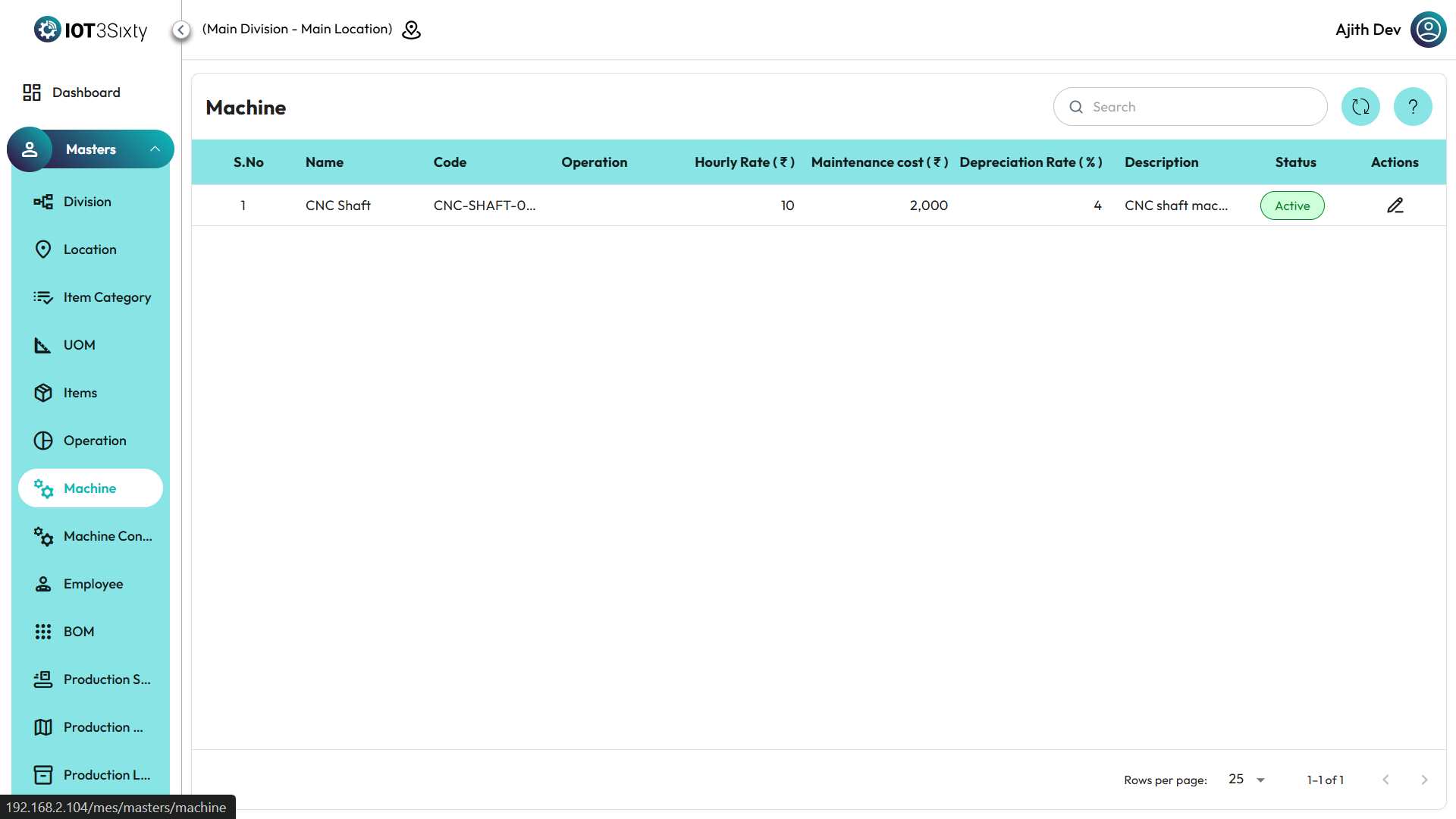
Editing Machine Information
- From the Machine List, locate the machine whose details need to be updated.
- Click on the Edit Icon under the Action column.
- Update any of the following fields as required:
- Machine Name
- Machine Type
- Maintenance Cost
- Depreciation Rate (%)
- Hourly Cost
- Status (Active / Inactive)
- After making the changes, click Save to update the machine record.
⚠️ Note:
New machines cannot be added directly in this module.
Only existing machine records can be viewed or edited to ensure centralized control over equipment data.
Additional Features
- Use the Search Bar to quickly find machines by name or type.
- Click the Refresh Icon to reload and update the machine list after any edits.
- Inactive machines are excluded from scheduling in production orders but remain visible for audit and maintenance tracking.
- The system ensures data consistency by restricting unauthorized modifications to machine cost parameters.
✅ Tip:
Regularly update the maintenance cost, depreciation, and hourly rate to keep cost calculations accurate and support better decision-making in production planning and budgeting.