Machine Configuration
The Machine Configuration module provides an overview of the communication setup and connectivity details for each machine integrated into the MES system.
It ensures that every machine is properly connected, configured, and synchronized with the MES server for real-time data collection and monitoring.
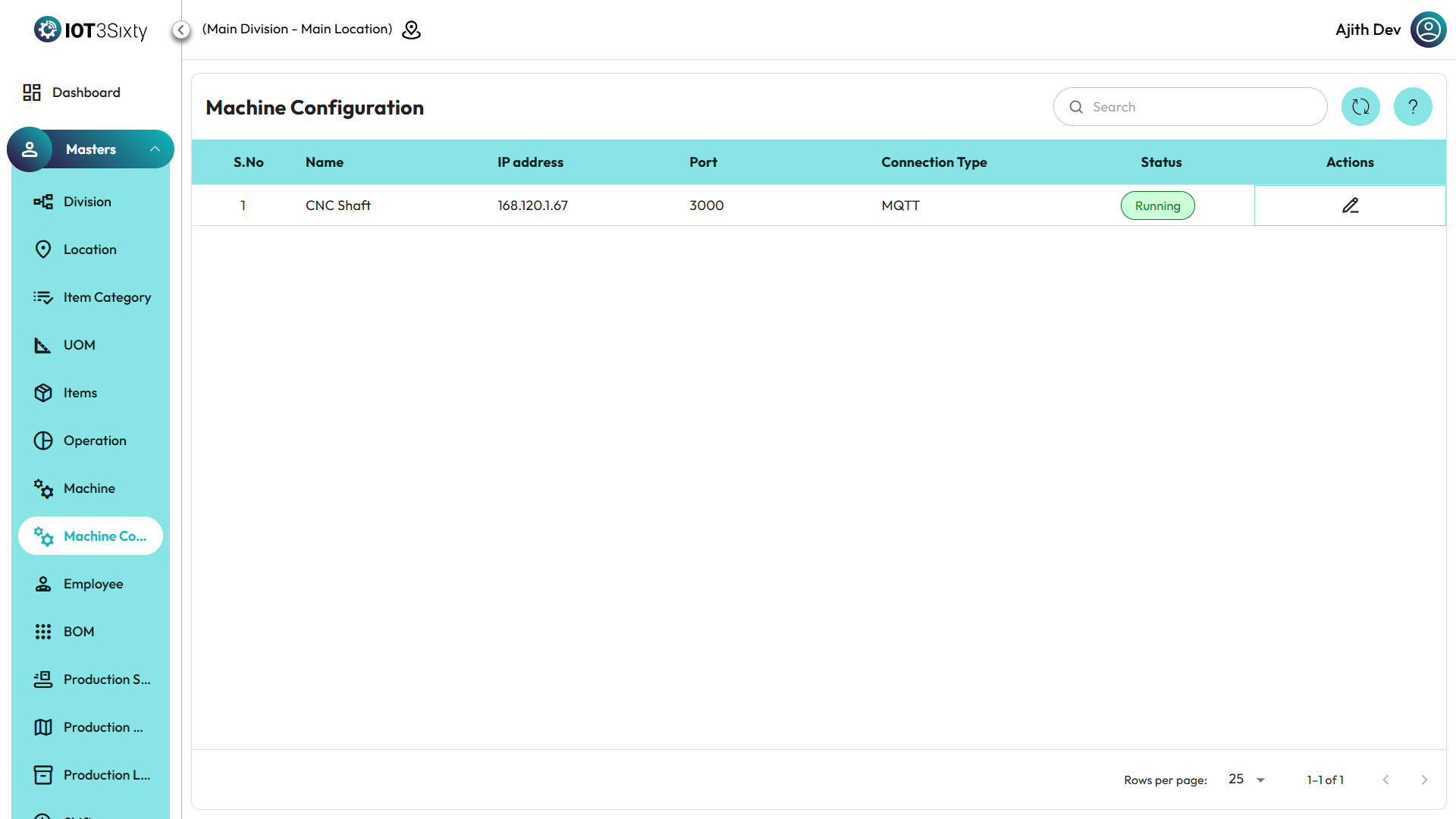
This configuration defines how machines communicate with the system — including their IP addresses, ports, and connection types — allowing seamless data flow between production equipment and MES.
Purpose
The Machine Configuration feature helps:
- Verify whether machines are properly connected to the MES network.
- Monitor each machine’s connection status (Running or Stopped).
- Maintain accurate details of IP configurations for troubleshooting and maintenance.
- Ensure reliable machine-to-system communication for real-time operation tracking.
Viewing Machine Configuration Details
-
Navigate to the Machine Configuration menu from the MES Dashboard.
-
The system displays a list of all configured machines with the following details:
- Machine Configuration Name – The unique name identifying the configuration or associated machine.
- IP Address – The network address through which the machine communicates with the MES system.
- Port – The specific communication port assigned for data transmission.
- Connection Type – Specifies the protocol or method of connection (e.g., TCP/IP, Serial, MQTT).
- Status – Indicates whether the configuration is currently Active or Inactive.
- Running/Stopped – Shows the live operational status of the machine’s connection to the MES.
Key Notes
- This module is view-only; users can view existing machine configuration details but cannot edit or add new configurations.
- The Running/Stopped indicator reflects the live connection state between the MES system and the machine.
- In case of a “Stopped” status, the maintenance or IT team should verify the machine’s network or hardware connection.
✅ Tip:
Regularly monitor the Machine Configuration list to ensure all machines are running and connected.
Disconnected machines may cause delays or missing data in production reporting.