Item
Item (Product)
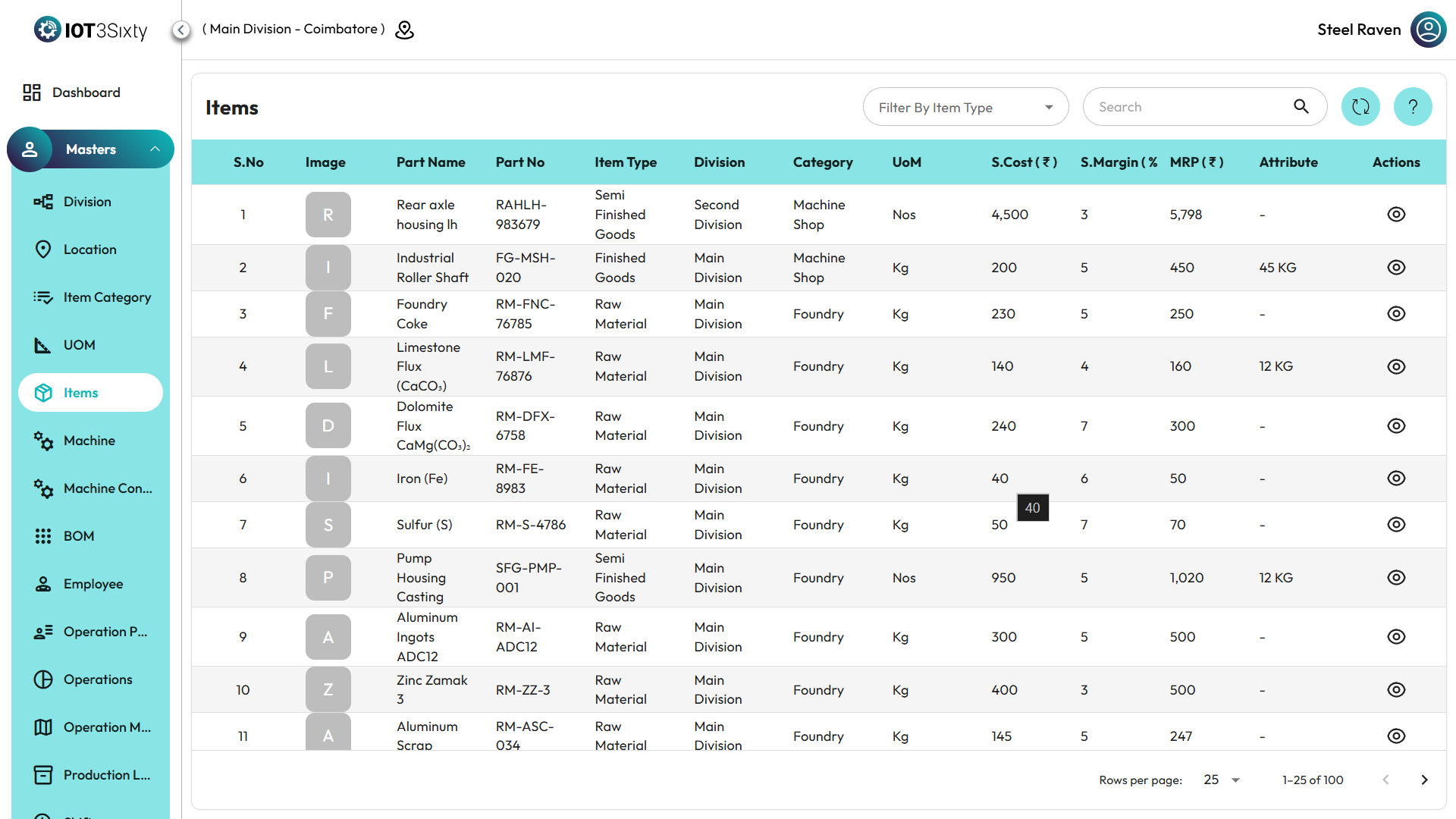
- Navigate to the Item (Product) section from the MES Dashboard or main menu.
- This section displays all the products or items created and managed within the MES system.
- Each item record contains key information used across production, inventory, and reporting modules.
Item Details Displayed
Each item includes the following information:
- Product ID – The unique identifier assigned to the item.
- Type – The classification or type of the item (e.g., Raw Material, Finished Product).
- Division – The division under which the item is created or managed.
- Status – Indicates whether the item is Active or Inactive.
- Category – The item’s category name, as defined in the Item Category section.
- UOM – The unit of measurement used for the item (e.g., Pieces, Kilograms, Liters).
Action Options
- Under the Action column, you will find an Icon for each item.
- By clicking this Sub Item Details Icon, you can view all related sub-item details.
- The sub-item details include linked components or variants associated with the main product.
✅ Tip: Ensure that every item is properly linked with the correct category and UOM before performing production or inventory operations. This helps maintain accurate tracking and reporting across the MES system.