Shift Scheduler
The Shift Scheduler is the heart of production workforce and machine scheduling.
It ensures that every Production Line runs efficiently by assigning appropriate Shifts to both machines and employees.
This tool brings together data from the Shift Master and Generate Shifts modules to provide a centralized scheduling dashboard that supports real-time visibility and control over production operations.
Purpose
The Shift Scheduler ensures that each production line operates at maximum efficiency by aligning:
- Shift timings
- Available employees
- Assigned machines
By providing a unified interface to manage all shifts, it minimizes conflicts, prevents over-allocations, and improves overall production planning accuracy.
Source Data
The Shift Scheduler automatically retrieves its information from other system modules to maintain accuracy and consistency:
-
Shift Master
Defines base configurations for each shift—start and end times, working days, and holidays.
These rules determine when shifts can be scheduled. -
Generate Shifts
Creates shifts dynamically for a selected date range based on the Shift Master setup.
The Shift Scheduler uses this generated data as its foundation for scheduling. -
Production Line Configuration
Each production line contains:- The machines available for that line.
- The employees assigned (operators, supervisors, technicians).
- The maximum production capacity or output goal.
✅ Integration Advantage:
Because the Shift Scheduler depends on these predefined modules, any updates (like adding a new shift type, marking holidays, or reconfiguring a production line) are instantly reflected in the scheduling view.
Schedule View
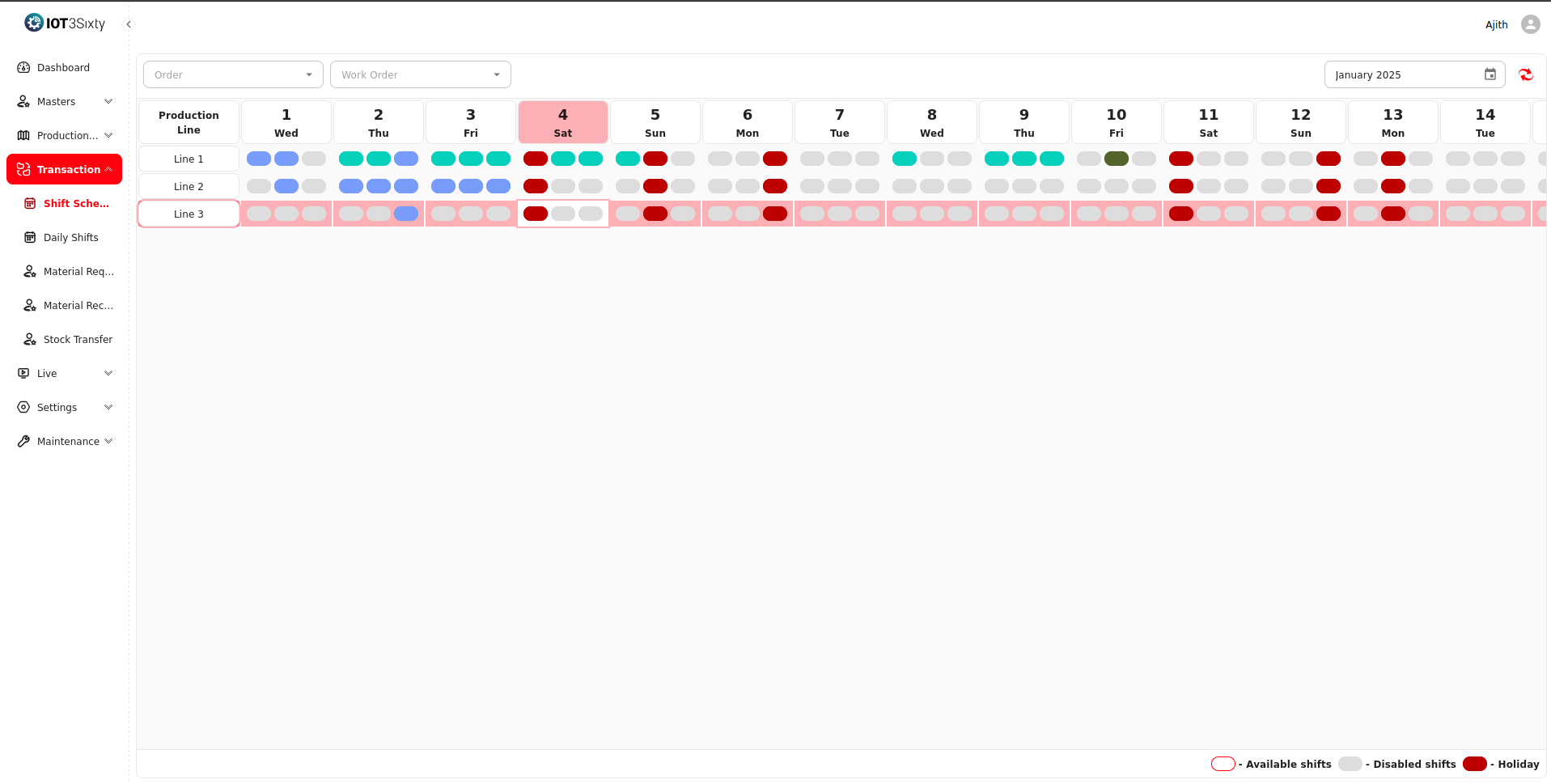
The Schedule View provides a real-time, calendar-style interface that shows all shifts within a selected date range.
Key Features
- Displays every generated shift within the chosen time period.
- Highlights unavailable or restricted days (such as holidays or maintenance periods) directly in the view.
- Color-coded indicators for better visibility:
- 🟢 Active Shift: Available for scheduling.
- 🔴 Unavailable Shift: Marked as a holiday or blocked in the Shift Master.
- 🟡 Partially Assigned: Indicates the shift is scheduled but still has unassigned resources.
Users can filter the view by:
- Production Line
- Shift Type
- Date Range
This enables supervisors to quickly verify where each resource is assigned and which shifts still need allocation.
Production Line Assignment
Once the available shifts are displayed, supervisors can assign them to production lines.
This step defines which machines and employees will operate under each shift.
Assignment Process
-
Select a Date Range:
Choose the desired period to view all available shifts. -
Review Available Shifts:
The system lists all generated shifts fetched from the Generate Shifts process. -
Select a Production Line:
Pick from available production lines, each configured with:- Line Name
- Supervisor
- Associated Machines
- Assigned Employees
- Maximum Capacity
-
Assign Shift:
Choose the shift (Morning / Evening / Night / Rotating) and assign it to the desired production line. -
Save Schedule:
Once saved, the system automatically maps:- Machines → To the selected shift.
- Employees → To the respective time slot.
- Shift details → To the production planning system for real-time monitoring.
Automatic Resource Scheduling
Assigning a shift to a production line triggers automatic scheduling for all associated resources:
- Machines are marked as “Running” or “Idle” depending on shift allocation.
- Employees are marked as “Assigned” for that specific shift duration.
- The system updates availability for future planning, avoiding double booking.
This ensures seamless coordination between machines, operators, and supervisors without manual tracking.
Benefits of the Shift Scheduler
| Feature | Description |
|---|---|
| Centralized Scheduling | All shift and resource management is performed from a single dashboard. |
| Conflict-Free Planning | Prevents double-booking of machines or employees across shifts. |
| Real-Time Visibility | Offers a clear view of scheduled, active, and unavailable shifts. |
| Automatic Updates | Changes in the Shift Master or Production Line setup reflect instantly. |
| Productivity Optimization | Balances workloads evenly across machines and employees. |
| Compliance with Working Hours | Respects employee working time rules and holidays defined in Shift Master. |
Typical Workflow
- Configure shifts in the Shift Master.
- Generate Shifts for the required time period.
- Open Shift Scheduler to view all generated shifts.
- Assign shifts to Production Lines (along with machines and employees).
- Monitor production as the system automatically reflects running and idle lines.
Summary
The Shift Scheduler is the control center of production timing and workforce allocation.
It provides complete operational transparency by showing who is working, on which machine, and when.
Through integration with Shift Master, Generate Shifts, and Production Line configurations, it ensures that the right people and machines are in place for every production run — maximizing efficiency and minimizing downtime.