Zone
The Zone module is part of the Masters section in the Warehouse Management System (WMS). Zones help organize storage areas within a specific location to make inventory tracking and space management easier.
Adding a New Zone
To create a new zone, follow these steps:
-
Click the Add New button.
-
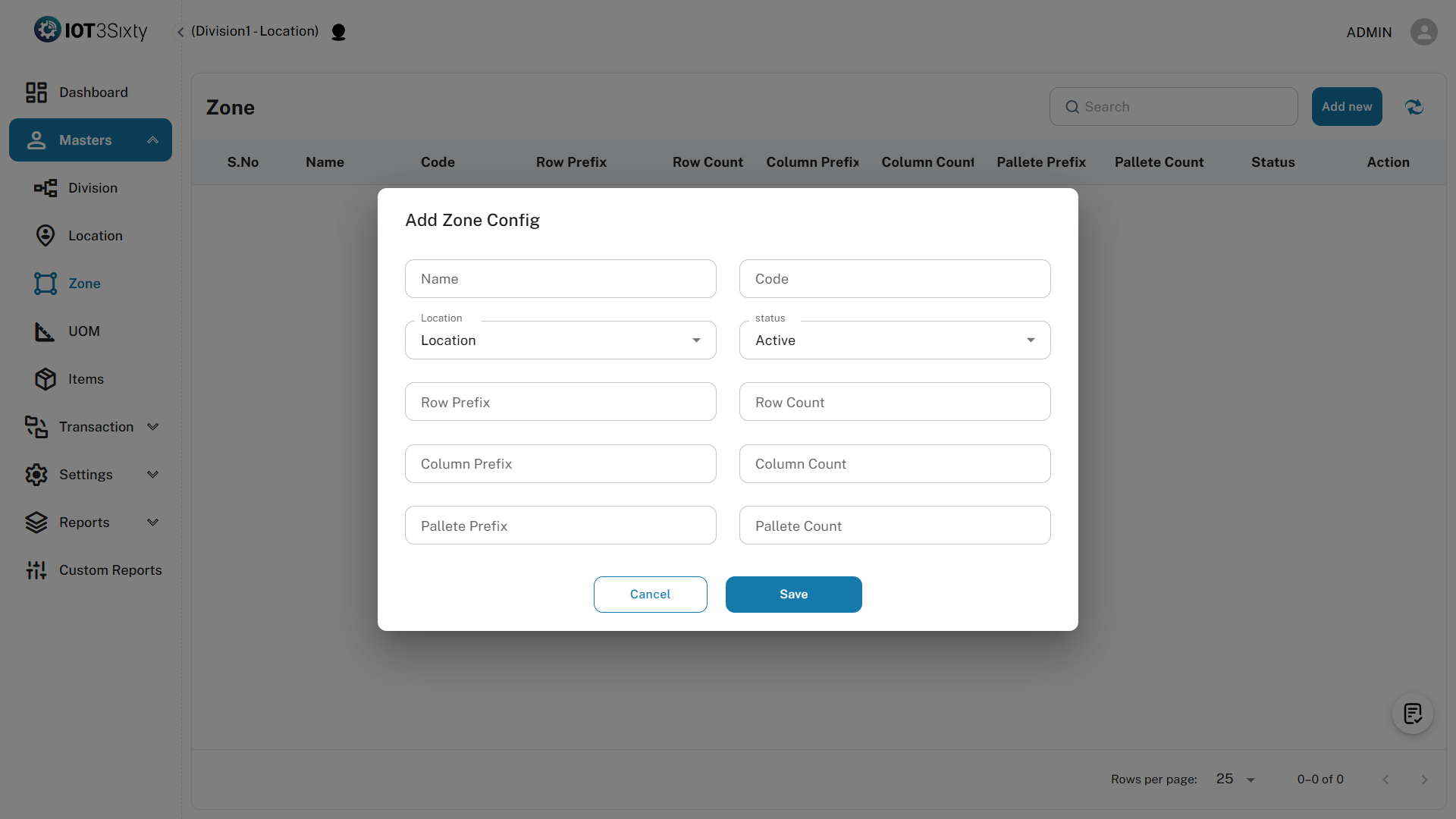
Fill in the following details:
- Name – Enter a unique name for the zone.
- Code – Provide a short code to identify the zone.
- Select Location – Choose the warehouse location this zone belongs to.
- Status – Choose whether the zone is Active or Inactive.
- Row Prefix – Prefix used to identify rows (e.g., "R").
- Row Count – Number of rows in the zone.
- Column Count – Number of columns in the zone.
- Pallet Prefix – Prefix for pallet codes (e.g., "P").
- Pallet Count – Number of pallets in the zone.
-
Click the Save button to create the zone.
Purpose of Zones
- Zones help organize storage areas within a location.
- They make it easier to manage row, column, and pallet-based inventory.
- Improve space planning, picking, and put-away processes.
Make sure to define clear names and codes for easy identification and reporting.