Items
The Items section in the Warehouse Management System (WMS) displays all the products or materials managed in the warehouse.
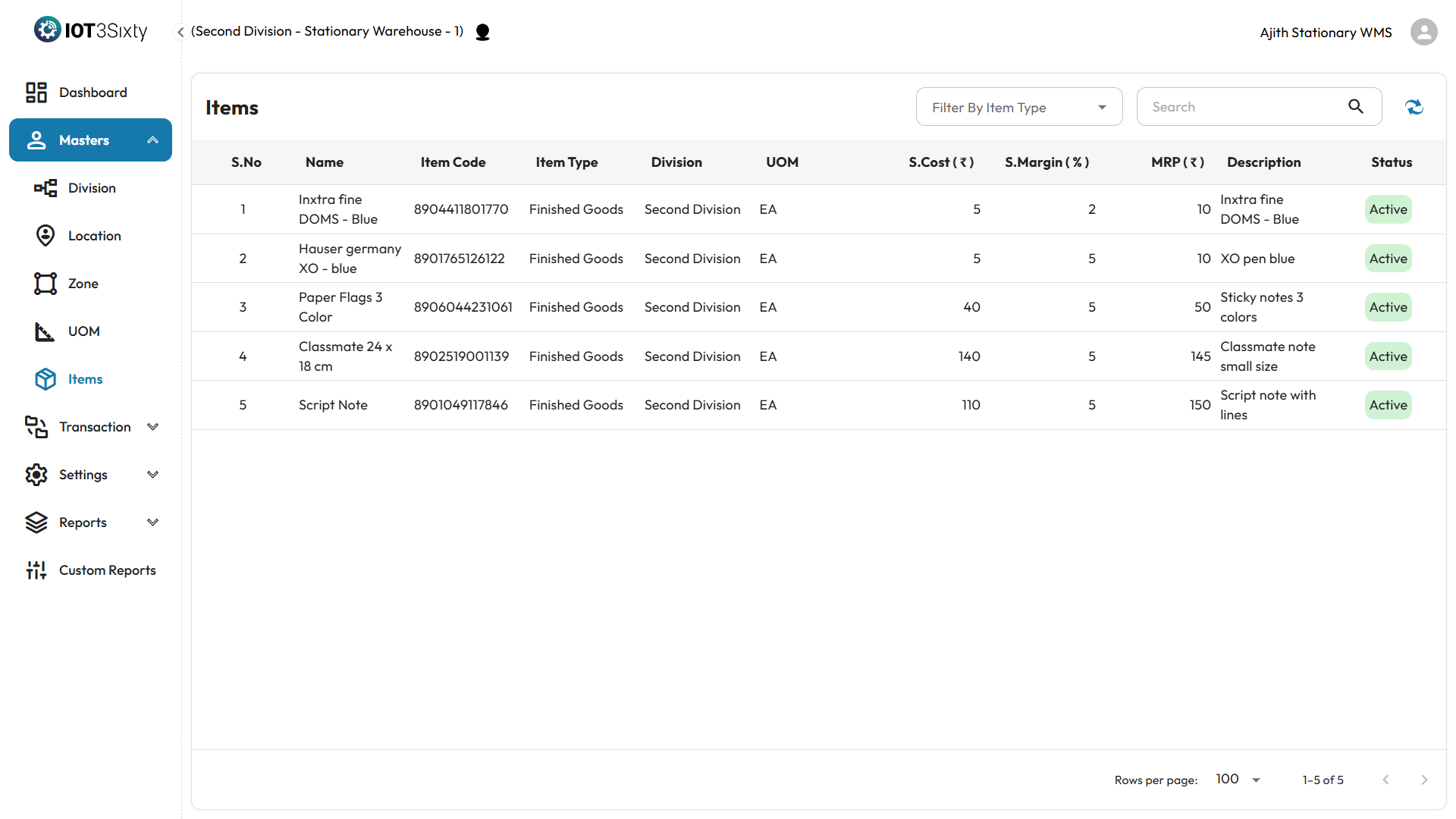
Overview
- Items are auto-generated by the system or by Admin during setup.
- You can view item details, but you cannot create or edit items unless you have specific permissions.
- Each item is linked to a Division, Unit of Measure (UOM), and Item Type.
What You Can View
Each item will display the following information:
- Name – The name of the item.
- Item Code – The system-generated unique code.
- Standard Cost – The base cost of the item.
- Margin – Profit margin percentage.
- MRP – Maximum Retail Price.
- Description – Additional details (if any).
- Status – Indicates whether the item is Active or Inactive.
- UOM – Unit of Measure assigned to the item.
- Division – The division to which the item is linked.
- Item Type – Classification or category of the item.
Why It Matters
- Items are the core of all warehouse transactions and reports.
- You’ll use items in stock receiving, transfers, adjustments, and more.
- Viewing these details helps in identifying and managing warehouse inventory efficiently.
If you need to request a new item or modify an existing one, please contact your Admin.